Publish and Revoke Results
Make the ranking and scoresheet visible to the public, and take them back if you need to.
Publishing makes a competition's results visible on the public website. It is a deliberate, reversible step: you can publish, check the public page, and revoke if something looks off.
What you can publish
| Item | Public sees | Confirmation you get |
|---|---|---|
| Prelim results (the ranking) | The ranked table. | Publish prelim results? → Publish results |
| Anonymized scoresheet | Judge-vote table with judges labeled Judge 1, 2, … | Publish anonymized scoresheet? |
| Named scoresheet | Judge-vote table with judge names visible | Publish named scoresheet? |
| Final results (the final ranking) | The ranked table with tie-break detail | Publish final results? |
You can publish the ranking without any scoresheet, or publish both.
What the panel shows you
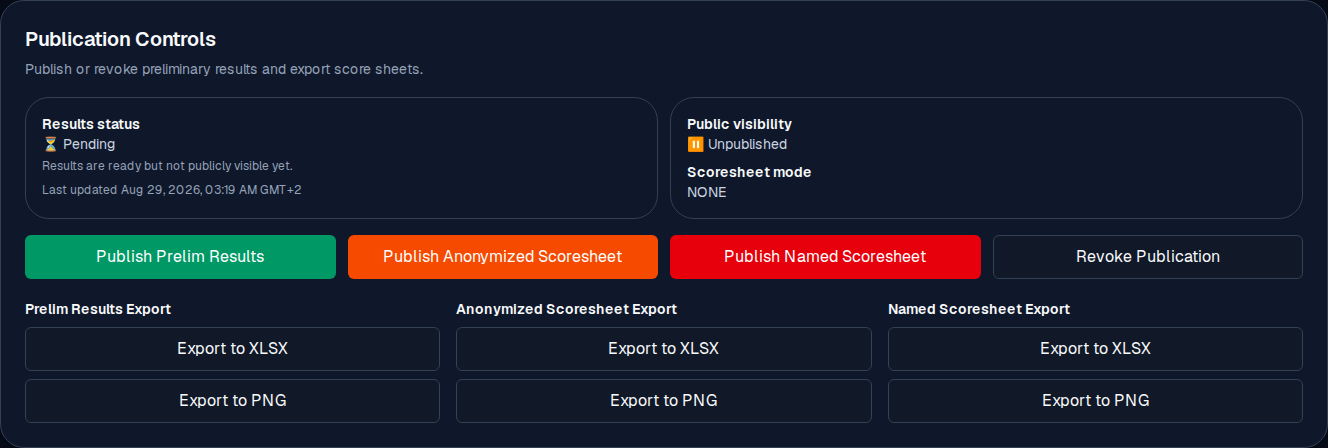
The Publication Controls card at the bottom of the competition editor has two status boxes and a row of action buttons:
- Results status is one of:
- ✅ Published (Results are visible on public pages.)
- ⏳ Pending (Results are ready but not publicly visible yet. This is the normal state after every judge has submitted and the ranking has been calculated.)
- 📝 Draft (Calculate results before publication.)
- Public visibility: ✅ Published or ⏸️ Unpublished.
- Scoresheet mode: NONE, ANONYMIZED, or NAMED, which scoresheet flavor is public (if any).
- Last updated: when the publication state last changed.
How to publish
- Confirm the result is current: every judge has Submitted, and Calculate has been run.
- In Publication Controls, click the action for what you want public: Publish Prelim Results (or Publish final results on a final), Publish Anonymized Scoresheet, or Publish Named Scoresheet.
- Confirm in the dialog. For a prelim it asks Publish prelim results? and the confirm button is Publish results.
- The status boxes flip to Published and you see a confirmation message.
Checking it went live
Open the public competition page (from the public event page) and confirm the ranking (and the scoresheet, if you published one) is showing. If it is not there, wait a few seconds and refresh: the public page is cached for a short time.
Schedule automatic publication
You can set the result to go live automatically at a chosen time, instead of publishing it by hand at that moment. This is useful on event day when you know the exact moment the floor is free but the ranking should not be public a few minutes early.
- Open the event page (not the competition editor) and find the competition in the Competitions list.
- On its row, pick the date and time in the picker next to Publish, then click Schedule. The app confirms with the exact time it will go live.
- The row now shows a Scheduled badge with that time, and the picker is replaced by a Cancel schedule button if you change your mind.
A few rules to know:
- You can schedule only once the ranking is ready to be published (all judges have submitted). Set it earlier and the app tells you the competition is not ready yet.
- Use Cancel schedule any time before the moment arrives to take the schedule back.
- Scheduling does not publish immediately; nothing is public until the time you chose.
Revoke
Click Revoke Publication. It asks Revoke publication? and the confirmation button reads Revoke all currently published prelim outputs. Use revocation when:
- you published the wrong ranking (for example, before all judges had submitted),
- the wrong scoresheet flavor is public (named when you meant anonymized, or the other way around),
- a correction happened (a fresh token, a judge re-submitted) and you need to re-run the ranking and republish.
Revocation removes public visibility only. The scores and the ranking remain in your organizer view, and the revocation is recorded in the event's audit record.
After a correction
- Fix the underlying data (see Data corrections).
- Re-run the ranking (the Calculate control in the competition editor). You commit it yourself.
- Publish again. The new state replaces the old one publicly; that step you do yourself.
Common mistakes
- Publishing before all judges have submitted. The panel still lets you do it (the ranking is computed from the votes already in). Wait, or knowingly publish a partial result.
- Publishing the named scoresheet when you meant anonymized. Revoke and publish the other flavor.
- Assuming the public page updates instantly. Give it a few seconds, then refresh.
- Forgetting to republish after a correction. A fix that is not republished does not change what the public sees.